SkyMeter Forecast - Predict Stunning Sunrises and Sunsets Before You Go
AI-powered sky colour forecast built for photographers, travellers, and anyone chasing beautiful light
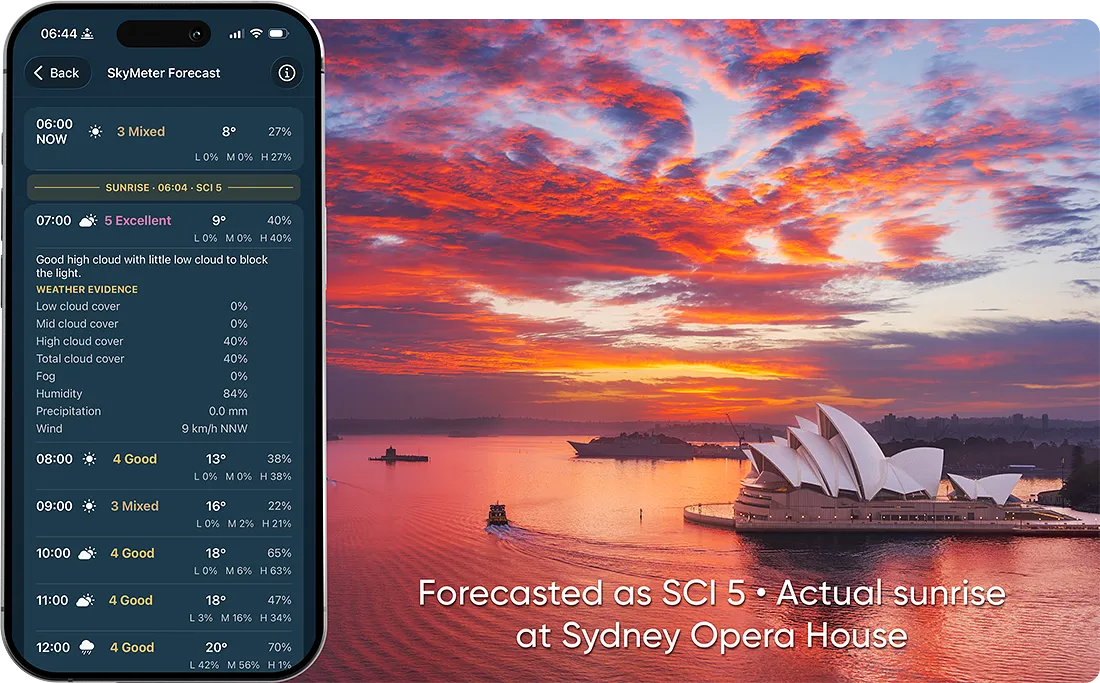
A real example of SkyMeter in action: the sunrise was forecast as SCI 5, and the actual sky over Sydney Opera House delivered exactly the kind of colour photographers hope for.
There's always that moment of doubt before a sunrise or sunset shoot. The alarm is set for before dawn, your gear is packed, and you already know exactly where you want to stand. But one question always lingers: Will the sky actually do something special?
Most weather apps can tell you the temperature, the chance of rain, or how much cloud cover to expect. What they rarely tell you is what photographers actually want to know - whether the light is likely to be good and whether there is a real chance of colour in the sky.
That's the gap SkyMeter was built to fill.
SkyMeter looks at forecast cloud layers, overall cloud structure, fog and how those conditions change around sunrise and sunset. Broken cloud and high clouds catching first light can help bring out colour, while gaps near the horizon can let light reach the clouds from underneath.
Open LExp on your iPhone and choose SkyMeter Forecast under Planning. With LExp Premium, you can see sunrise and sunset summaries and an hourly forecast for your current location. In a few seconds, you can see whether the light looks promising enough for an early start or an evening drive.
It is a forecast built specifically for people who chase light. Know before you go.
In one SkyMeter forecast, a sunrise over the Sydney Opera House was rated SCI 5. The sky that morning delivered exactly the kind of colour photographers hope for.
Why Standard Weather Apps Are Not Enough
Anyone who has photographed sunrises and sunsets for a while has probably been caught out by this more than once. You open a regular weather app and see something that looks promising - perhaps 40% cloud cover, no rain, decent visibility - and on paper it seems worth going. Yet when you arrive, the sky is flat, the horizon is blocked, or the cloud layer is simply too thick to let the light break through. On other days the app might suggest poor conditions, only for the sky to erupt into colour because a broken band of high cloud caught the first light perfectly.
The problem is that general weather apps are not really designed around the way photographers think about the sky. They are built to answer everyday questions such as whether you need an umbrella, how warm it will be, or whether it will be windy. For photography, especially around sunrise and sunset, the question is far more specific. It is not simply about whether there are clouds, but what kind of clouds they are, where they sit in the sky, how dense they are, and whether the horizon remains open enough for light to travel through.
A sky with 70% cloud cover can be spectacular if the cloud is high and broken. A sky with 20% low cloud sitting right on the horizon can completely kill the sunrise. The same cloud percentage can mean two completely different photographic outcomes depending on structure and altitude. This is why interpreting weather data manually often turns into guesswork, even for experienced photographers.
What matters most is the interaction between cloud layers and light. High cloud can catch the first or last rays and produce the glow that photographers look for. Broken cloud can create texture and depth across the frame. Clear air and an open horizon can make the difference between a pale wash of colour and a sky that genuinely comes alive.
That is exactly the part SkyMeter is designed to analyse. It looks at the forecast cloud layers, overall cloud structure and fog, giving you more to go on than a single cloud percentage when you decide whether a shoot is likely to be worthwhile.
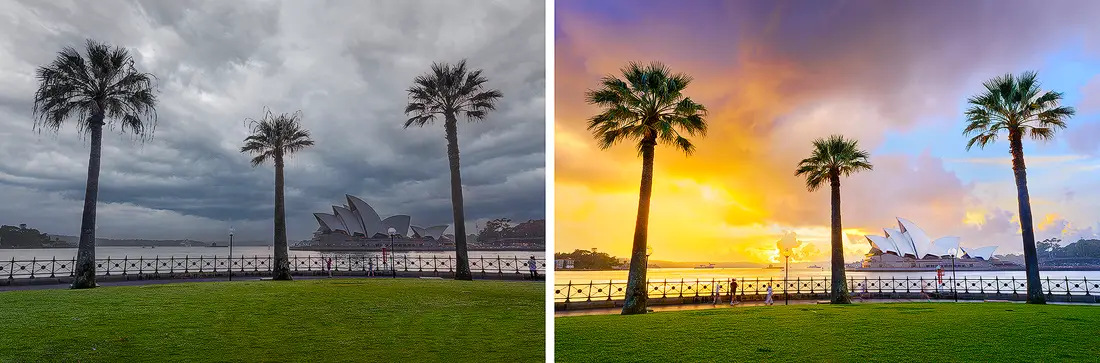
Compare poor forecast conditions with the real sky and avoid wasted early starts.
How SkyMeter Helps You Decide
The whole idea behind SkyMeter is to take something that is genuinely difficult to judge from raw weather data and turn it into a decision that can be made in seconds.
Behind the scenes, SkyMeter looks at forecast low, mid-level and high cloud, overall cloud structure, fog and how those conditions develop around sunrise and sunset. These are the kinds of conditions that often determine whether a sunrise or sunset will simply be bright, or whether it has the potential to produce the colour, depth, and texture photographers are really looking for.
Rather than presenting that complexity back to you as numbers and charts, SkyMeter translates it into a simple score: SCI, or Sky Colour Index.
SCI is designed as a practical guide to the photographic potential of the sky around sunrise and sunset. A lower score suggests that conditions are unlikely to produce strong colour, while a higher score indicates that the cloud structure and light conditions are lining up in a way that is far more promising. A high score can also point to clean light under a clear sky. The score gives you a clearer starting point for making your own judgement before you decide whether to head out.
This is where the forecast comes in handy in real life. Instead of checking several apps and trying to interpret cloud percentages yourself, you can open SkyMeter Forecast in LExp and look at the conditions for your current location. Within a few seconds, you can see whether the best chance of colour is likely to be around first light, the following hour, or whether the conditions are simply not worth the drive.
For anyone who regularly photographs landscapes, city skylines, coastlines, or travel scenes, that simple decision point matters. It saves time, saves unnecessary early starts, and helps you put your effort into the mornings and evenings that are most likely to deliver something memorable.
The aim is not to predict every sky perfectly. Nature will always have its surprises. The aim is to give photographers a far better way to judge whether the light is worth chasing before they leave home.
How to Read the Forecast
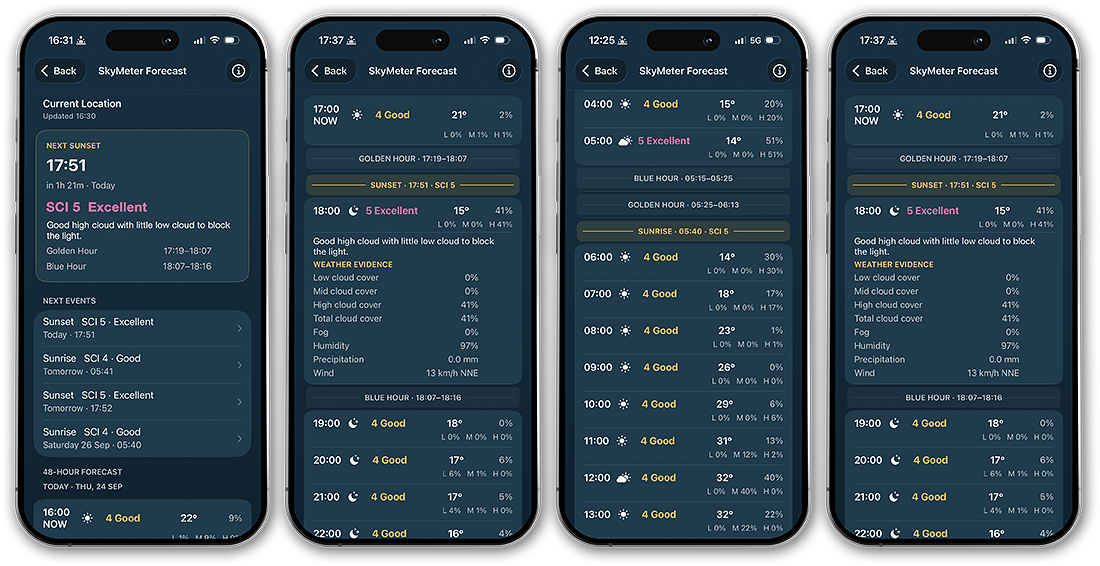
A simple colour-coded Sky Colour Index forecast delivered directly to your iPhone.
One of the most important ideas behind SkyMeter is simplicity.
Most photographers do not want to spend time interpreting weather models, cloud percentages, or multiple forecast layers when they are deciding whether to head out for sunrise or sunset. The forecast needs to be something you can understand in a matter of seconds, especially when you are checking it late in the evening before an early start, or quickly looking at conditions before deciding on an evening shoot.
In LExp, start with the sunrise or sunset summary for a quick read on the event. Then look at the hourly forecast, where each row shows the time, a weather icon, a numerical SCI score with its rating, and cloud information. The cloud layers can help you see what's behind the score.
For each hour around the sunrise or sunset window, SkyMeter shows the expected Sky Colour Index (SCI). This gives you a clear view of how conditions are expected to develop, rather than a single fixed score.
Around sunrise, for example, the time and SCI in three consecutive hourly rows might read like this.
- 4 Good
- 5 Excellent
- 3 Mixed
This means that the strongest potential for colour is expected around 07:00. Conditions already look favourable at 06:00 and become more uncertain by 08:00.
The Sky Colour Index (SCI) rates the photographic potential of the sky around sunrise and sunset on a scale of 1 to 5. Higher ratings indicate more promising conditions for colour, glow or visually interesting light. Treat SCI as a practical rating without an assigned percentage chance or a guarantee of colour.
The SCI scale itself is deliberately simple and intuitive.
- SCI 1 · Poor. Very unfavourable conditions for colourful sunrise or sunset photography.
- SCI 2 · Weak. Some colour may be possible, but conditions are mostly unfavourable.
- SCI 3 · Mixed. Uncertain conditions. It could go either way.
- SCI 4 · Good. Favourable photographic conditions, with useful cloud structure or a clean, clear sky with good light.
- SCI 5 · Excellent. A very favourable setup with strong potential for colourful, dramatic conditions.
In practical terms, a score of 4 or 5 is usually the kind of forecast that makes the early start worth serious consideration. A 3 suggests conditions are uncertain and may depend on local cloud behaviour, while 1 or 2 generally indicates that strong colour is unlikely.
What matters just as much as the score itself is the pattern across the time window. Sometimes the sky may not peak exactly at sunrise or sunset, but in the hour immediately before or after, when high cloud catches the changing angle of light. Seeing the progression across the forecast window helps you decide not only whether to go, but when the best light is most likely to happen.
Open SkyMeter Forecast in LExp, glance at the summary and look at the hours either side. The idea is to know within moments whether the sky looks worth chasing and when you want to be there.
Subjectivity
One thing worth saying is that the quality of a sunrise or sunset is always subjective. Two photographers can stand in exactly the same spot, look at the same sky, and come away with completely different impressions of how good it was. For someone who loves dramatic cloud texture and bold bands of colour, a layered sky might feel like a perfect 5. For someone else who enjoys clean silhouettes, reflections, minimalist compositions, city skylines, or long-exposure seascapes, a clear glowing horizon can be just as compelling. A lot of it comes down to personal style, and what you actually enjoy photographing.
SkyMeter's SCI is meant to be a practical guide that gives you a strong sense of the sky’s photographic potential, but the final call is always yours. Over time, most photographers start to read the forecast through the lens of their own style and the conditions they tend to love most.
A Special Note About Clear Skies
A clear sky is intentionally rated as SCI 4.
A 5 is reserved for those rare conditions when cloud structure and atmospheric light line up to create strong colour and drama across the sky. Those are the mornings and evenings that can produce truly exceptional images.
Many photographers genuinely enjoy shooting under a completely clear sky. Clean horizons, crisp silhouettes, minimalist compositions, city skylines, and strong direct light can all work beautifully under a cloudless sky. For that reason, clear conditions are deliberately scored as a solid 4.
In SkyMeter, a 3 means uncertainty, where the result could go either way. When the forecast shows a cloudless sky, it gives you a clearer idea of the kind of light to plan for, even if you prefer to shoot with clouds. An SCI of 4 can also mean useful cloud structure, so look at the cloud layers and the explanation in LExp to see which conditions are behind the score.
Uncertainty and Why The Forecast Can Change
Weather forecasts are never fixed, and sunrise or sunset predictions are no different. The atmosphere is constantly shifting, and even a small change in cloud position or height can noticeably affect the light at first or last light.
This becomes even more important the further ahead you look. A forecast for tomorrow morning is generally less certain than one you check three hours before sunrise. As the event gets closer and newer weather data becomes available, the SCI can change and the overall picture will often become clearer.
If you're setting an alarm or planning a drive, use the forecast to make an initial call and check it again closer to sunrise or sunset if you can. A high SCI can still be followed by a muted sky, and a low SCI can still leave room for an unexpected burst of colour.
That said, local conditions still play a big role. A slight shift in coastal cloud bands, sea fog, or high cloud can quickly change the outcome, especially around Sydney where the weather often moves fast. The forecast works best as a decision tool alongside what you can already see in the sky as the moment approaches.
Forecasts for Your Current Location
SkyMeter Forecast uses your iPhone's current location to show the conditions and local solar times for where you are. Open it under Planning in LExp and allow location access when prompted.
With LExp Premium, you can see sunrise and sunset summaries and a continuous 48-hour forecast. The summary gives you a quick sense of the next useful window, and the hourly view helps you see how the weather is expected to change before and after it.
Whether you photograph coastlines, city skylines, mountain lookouts, or travel destinations, a local forecast is at the heart of what SkyMeter is built for. Check the forecast where you are, and consider what you know about your viewpoint and how conditions might differ along the way.
Why Photographers Use SkyMeter
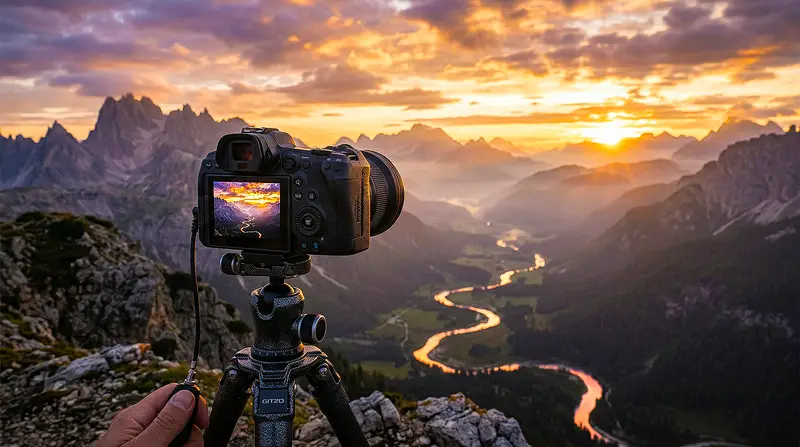
Know when to head out so you arrive before the light begins to build.
For anyone who regularly photographs landscapes, city skylines, coastlines, mountains, or travel scenes, timing is everything. The difference between an ordinary frame and a memorable one often comes down to a very small window of light, sometimes no more than twenty or thirty minutes.
The difficulty is that this window is also the hardest to judge in advance.
A standard weather forecast may tell you there will be cloud, but it does not tell you whether that cloud is likely to work for the image or against it. It does not tell you whether the horizon is likely to remain open, whether the higher cloud layers may catch first light, or whether the sky has the kind of structure that creates colour and atmosphere.
That is why photographers use SkyMeter.
It helps remove much of the uncertainty that usually surrounds sunrise and sunset planning. Instead of relying on guesswork, instinct, or checking several weather apps, you have a forecast designed specifically around the way photographers think about light.
For early starts, this can mean fewer unnecessary alarms and fewer wasted drives. For evening shoots, it gives you more confidence about whether it is worth leaving work a little earlier, driving to the coast, or heading to a lookout before sunset.
Just as importantly, it helps you recognise the mornings and evenings that genuinely look promising.
No forecast can guarantee the sky, and nature will always keep a degree of unpredictability, but SkyMeter gives photographers a much clearer sense of when the conditions are likely to be worth chasing.
Frequently Asked Questions
How accurate is SkyMeter?
SkyMeter is designed specifically for sunrise and sunset photography. It uses forecast cloud layers, overall cloud structure and fog to rate the photographic potential of the sky. The result depends on how those conditions actually develop, so use the rating as a guide alongside what you see when the time comes.
Is this just another weather app?
SkyMeter is part of LExp and has a specific purpose. It helps photographers decide whether the sunrise or sunset looks promising enough to justify going out, and when they might want to arrive.
How do I view the forecast?
On your iPhone, open LExp and choose SkyMeter Forecast under Planning. The preview shows your local solar times. LExp Premium gives you the live forecast, which you can also open from Magic Hours.
How far ahead can I see the forecast?
With LExp Premium, you can view the next 48 hours for your current location. Use the sunrise and sunset summaries to see whether an upcoming shoot looks promising, then check the hourly SCI to get a sense of when the light might be best.
What does SCI mean?
SCI stands for Sky Colour Index. It is a simple score that estimates the photographic potential of the sky around sunrise and sunset, helping you quickly judge how promising the conditions are.
Which location does SkyMeter use?
Ready to Know Before You Go?
If you regularly photograph sunrise or sunset, SkyMeter is designed to help you make faster and more confident decisions before you leave home.
Open SkyMeter Forecast in LExp to check conditions for your current location, see when the light is most likely to peak, and spend more of your time chasing the skies that are genuinely worth it.

Know before you go.